
Part 2 - Consuming custom WCF Data Services (oData) Endpoint (Javascript/jQuery and c#) - Create and Delete#
In the first post we have created a service which worked fine for retrieving data. most time we also need delete and create functionality. Here is how it works.
This Article is based on the Part 1 - Consuming custom WCF Data Services. If you just want to download the current version or check out the code, check the codeplexproject page.
Preparation:
Add JSON2 (via NuGet)
Add Styles-Folder
Implementation:
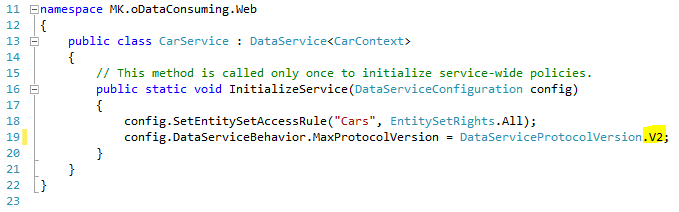
- Configure DataService to V2
At the moment, the V3 Implementation of Microsoft doesnot support Create Functionality. You will run into a 415 Unsupported Media Type Exception. More information you can find on Stackoverflow.
The solution for this is quite simple. Just change the value for MaxProtocolVersion in your Service from “V3” to “V2” .
The difficult part of the Create/Delete Functionality was to create a custom IUpdatable Implementation. Well, this is NOTrequired for your implementation. You can just replace my implementation with your Entity-Framework Context.
I want my example independent from database/files. So i have created a static collection of items, controlled by the Context.
- Replace CarContext.cs code with the following.
using System;
using System.Collections.Generic;
using System.Linq;
using System.Web;
using System.Data.Entity;
using System.Data.Services;

namespace MK.oDataConsuming.Web.Model {
 public class CarContext : IUpdatable {

 #region Members
 private static ListCar> _cars;
 #endregion

 #region Constructor
 public CarContext() {
 if (_cars == null) {
 _cars = new ListCar>();
 }
 }
 #endregion

 #region Properties
 public IQueryableCar> Cars {
 get {
 return _cars.AsQueryableCar>();
 }
 }
 #endregion

 #region IUpdatable Methods
 public void AddReferenceToCollection(object targetResource, string propertyName, object resourceToBeAdded) {
 throw new NotImplementedException();
 }

 public void ClearChanges() {
 throw new NotImplementedException();
 }

 public object CreateResource(string containerName, string fullTypeName) {

 Car car = new Car();

 int tmpId = 0;
 if (_cars.Count > 0) {
 tmpId = _cars.Max(c => c.Id);
 }

 car.Id = ++tmpId;
 return car;
 }

 public void DeleteResource(object targetResource) {
 ListCar> carsToDelete = (ListCar>)targetResource;
 Car carToDelete = carsToDelete[0];
 _cars.Remove(carToDelete);
 }

 public object GetResource(IQueryable query, string fullTypeName) {
 ListCar> carList = query.CastCar>().ToList();
 return carList;
 }

 public object GetValue(object targetResource, string propertyName) {
 throw new NotImplementedException();
 }

 public void RemoveReferenceFromCollection(object targetResource, string propertyName, object resourceToBeRemoved) {
 throw new NotImplementedException();
 }

 public object ResetResource(object resource) {
 throw new NotImplementedException();
 }

 public object ResolveResource(object resource) {
 if (resource is Car) {
 _cars.Add((Car)resource);
 }
 return resource;
 }

 public void SaveChanges() {
 //We don't have any database/file to store the data in this test.
 }

 public void SetReference(object targetResource, string propertyName, object propertyValue) {
 throw new NotImplementedException();
 }

 public void SetValue(object targetResource, string propertyName, object propertyValue) {
 if (propertyName == "Manufacturer") {
 ((Car)targetResource).Manufacturer = (string)propertyValue;
 } else if (propertyName == "ProductionYear") {
 ((Car)targetResource).ProductionYear = (string)propertyValue;
 } else {
 throw new Exception("Property not implemented.");
 }
 }
 #endregion
 }
}
This is not a reference implementation of IUpdatable. At the moment i have not found a good documentation/example. So i have tested a little bit. It works for testing purposes.
- Add new item (to Styles-Folder) –> Web –> Style Sheet
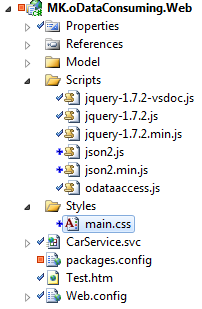
- Add css-Code
body
{
 background: none repeat scroll left top #EEEEEE;
 color: #444444;
 font: 13px Arial,Tahoma,Helvetica,FreeSans,sans-serif;
}

div.entry
{
 background-color: White;
 width: 300px;
 border: 1px solid #444444;
 padding: 2px;
 margin: 1px;
}

div.entry_delete
{
 text-align: right;
}

div.buttonarea
{
 text-align: right;
 width: 300px;
}

div.inputfields
{
 text-align: right;
 width: 300px;
}
Only some basic formatting…
- Update odataaccess.js
The javascript-part is extended with examples for create and delete. I also have added a UI Clear-Function. You can just comment out the first line of the “RetrieveData” Method if you want to see the history of your actions.
/*
* Retrieve data from service
**/
function RetrieveData() {
 ClearView();
 $.ajax({
 type: "GET",
 async: false,
 contentType: "application/json; charset=utf-8",
 datatype: "json",
 url: "/CarService.svc/Cars",
 success: RetrieveMultipleCallback,
 error: function () {
 alert("Error");
 },
 beforeSend: function (XMLHttpRequest) {
 XMLHttpRequest.setRequestHeader("Accept", "application/json;odata=verbose");
 }
 });
}

/*
* Handles the RetrieveMultiple Response
**/
function RetrieveMultipleCallback(data) {
 var $newDiv;
 $.each(data.d, function (i, item) {
 $newDiv = $("
" +
 "

" + item.Id + " - " + item.Manufacturer + " - " + item.ProductionYear + "

" +
 "

" +
 "

");
 $("#listofcars").append($newDiv);
 });
 $newDiv = $("
----

");
 $("#listofcars").append($newDiv);
}

/*
* Create data by service
**/
function CreateData(id) {
 var car = {};

 var man = $("#man_id").val();
 var year = $("#year_id").val();

 car.Manufacturer = man;
 car.ProductionYear = year;

 var carStringified = JSON.stringify(car);

 $.ajax({
 type: "POST",
 async: false,
 data: carStringified,
 contentType: "application/json",
 datatype: "json",
 url: "/CarService.svc/Cars",
 success: CreateCallback,
 error: function () {
 alert("Error");
 },
 beforeSend: function (XMLHttpRequest) {
 XMLHttpRequest.setRequestHeader("Accept", "application/json");
 }
 });
}

/*
* Handles the Create Response
**/
function CreateCallback(data) {
 $("#man_id").val("");
 $("#year_id").val("");
 RetrieveData();
}

/*
* Delete data by service
**/
function DeleteData(data) {
 $.ajax({
 type: "DELETE",
 async: false,
 //data: carStringified,
 contentType: "application/json",
 datatype: "json",
 url: "/CarService.svc/Cars(" + data + ")",
 success: DeleteCallback,
 error: function () {
 alert("Error");
 },
 beforeSend: function (XMLHttpRequest) {
 XMLHttpRequest.setRequestHeader("Accept", "application/json");
 }
 });
}

/*
* Handles the Delete Response
**/
function DeleteCallback(data) {
 RetrieveData();
}

/*
* Clears the entry-view
**/
function ClearView() {
 $("#listofcars").empty();
}- Run and test the Web Project
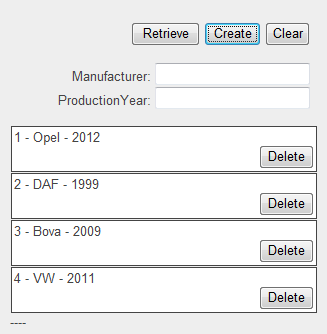
The List is empty if you start first. So just add some entries by yourself.
Cheers,
Markus